Support "Out of Office" events
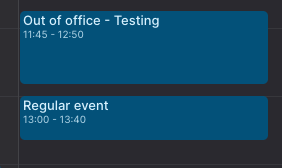
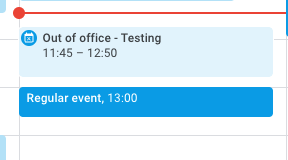
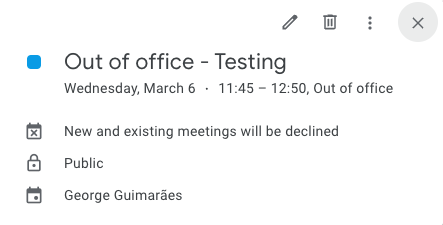
Out of Office events are a different type of event in Google Calendar. They are, by default, public events and make any conflicting event to be declined for you.
It seems that I cannot create such events in Akiflow's interface, and such events created in Google Calendar interface doesn't appear differently as it would.
Log in to comment and vote
Comments18
Robert
Oct 30, 2024
The way akiflow handles OOO events also messes up the stats, as they are counted as hours spent on an event. It would be great if this could be changed.
Jeson P
Nov 8, 2024
RB: Thank you for sharing this! I forwarded this to the relevant team for review :)
James
Mar 12, 2024
Adding my vote here. This event type is super useful because it can auto-decline other events and send a message.
Šimon
Dec 30, 2023
Yeah, it's ugly, I get every day of the work week like this due to regular OOOs that happen every week for a different client I work for.
edit: For anyone looking for a workaround, I found a neat way. Use https://cron.com/ calendar and add your calendars there -> then use "block events from this calendar" in the other calendar. In my case I block from my main calendar to the two clients calendars and block from their calendars into my primary and then only show my primary one in Akiflow. Then unblock the all day events in your primary calendar and they won't show in the Akiflow interface 🎉
[Deleted User]
Jan 8, 2024
Šimon Demočko: Hi Simon! Can you share how do you see these events on Google Calendar or Outlook? Are these shown as all-day events?
Šimon
Jan 8, 2024
Stefania: Hm, you know what, you are right, they do show columns. but it's more like a coloring behind events and not like an event that spans the whole space. That's for google calendar. As for cron, that shows it just like an all day event. Screenshot is google calendar.
[Deleted User]
Aug 25, 2021
Hi Cathrine, may I ask you a screenshot of what you would like to be improved?
Cathrine Døviken
Aug 25, 2021
Stefania: In Google Calendar you can choose Out Of Office.
In Akiflow this event fills up t he whole days instead of it being shown as a all-day event.
[Deleted User]
Aug 25, 2021
Cathrine Døviken: thank you so much for the clarifications! I edited the request title so it's clearer for me when I read all of them :) Thanks again for your feedback
General request
Apr 7
•Merged request
•1 vote
Suppress Google "Out of Office" (OOO) events by calendar
Akiflow Team
Apr 6
Hi there! Thanks for the thoughtful suggestion. At the moment, it’s not possible to selectively hide specific event types (like Out of Office) from a calendar in Akiflow without hiding the entire calendar. We understand how OOO events can create unnecessary clutter, especially when they’re primarily meant for team visibility rather than personal planning.
You’re absolutely right that Google Calendar exposes an
eventTypefield (includingoutOfOffice), and filtering based on that would be a very clean solution. This kind of granular control over calendar visibility is something we agree would significantly improve the experience.We’ll make sure to pass this along to the team as a feature request. In the meantime, the only workaround would be to hide the entire calendar, although we understand that’s not ideal in your case.
Really appreciate you taking the time to share this, it’s a valuable insight 🙌