Switching from Morgen to Akiflow
A practical guide to map Morgen daily planning to Akiflow. Set up rituals, connect integrations, and migrate your backlog.
Welcome to Akiflow
If you've been using Morgen, you already think in calendar terms: your day is built around blocks, meetings and tasks live side by side, and your calendar is your command center. Akiflow is built on the same foundation.
The transition is natural. Here's how your Morgen workflow maps across.
Calendars
In Morgen, you aggregate multiple calendars across Google, Outlook, iCloud, and Fastmail into a single unified view.
In Akiflow, you can connect Google Calendar, Outlook Calendar, and iCloud Calendar to see your events together and sync event changes both ways. For iCloud, connect with your Apple Account email and an app-specific password. Fastmail is not a native calendar integration.
Frames → Time Slots
Morgen's Frames let you define blocks of time dedicated to a specific type of work (deep work, quick wins, admin) and filter which tasks get scheduled into each one.
The natural equivalent in Akiflow is Time Slots. You define recurring blocks on your calendar, a Deep Work slot from 9–11am, a Quick Wins slot at 5pm, and use them as your daily scheduling structure. Drag tasks from your Inbox or Today into those slots to build your day intentionally, without automation getting in the way.

AI Planner → Aki
Morgen's AI Planner analyzes your tasks and deadlines, auto-schedules them into Frames, and lets you preview and approve before anything lands on the calendar.
Akiflow's Aki works differently: it's a conversational AI copilot. Tell Aki what you need (plan my morning, reschedule everything that's overdue) and it acts on your tasks and calendar. Less auto-scheduler, more intelligent assistant.

Task integrations → Inbox
In Morgen, you connect task sources (Notion, Todoist, Linear, ClickUp, Obsidian, Google Tasks, Microsoft To Do) and they appear alongside your calendar for scheduling.
In Akiflow, tasks from connected tools feed into the Inbox, a single capture point where new work lands before you decide when to do it. From the Inbox, move tasks into Today to work on them, or onto your calendar to time-block them. This separation between captured work and planned work is the main structural difference from Morgen.

Time blocking
In Morgen, you drag tasks onto your calendar manually or let the AI Planner schedule them within a Frame.
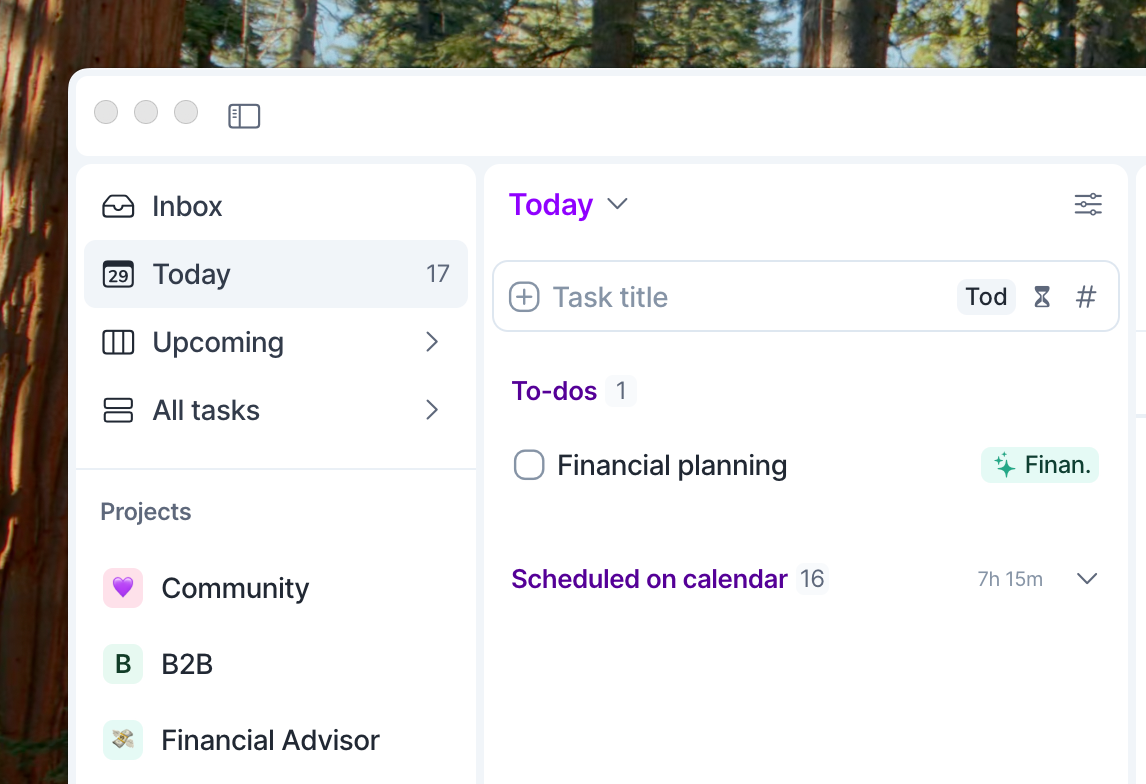
In Akiflow, drag any task onto your calendar from Today or Inbox to create a time block. To show the task as an event in Google Calendar, Outlook Calendar, or iCloud Calendar, use the Lock feature and choose a calendar you can edit. Scheduling a task in Akiflow alone does not create an event on your external calendar. The block stays visible in your Today list under Scheduled on Calendar.
Daily planning → Morning Ritual
Morgen surfaces your tasks and meetings in a unified daily view. You review them at the start of the day and schedule manually or via AI.
In Akiflow, the Morning Ritual is your daily planning: a guided flow that shows you what's in your Inbox, what's still pending from yesterday, and what's on your calendar. You drag tasks into Today, schedule them, and commit to your day. Takes 5–10 minutes.

Command Bar
Morgen has a global keyboard shortcut to create tasks and events quickly from anywhere.
Akiflow's Command Bar (⌘E / Ctrl+E) works the same way, hit it from anywhere, type a task, assign a time, and it goes into your plan instantly. It also lets you search across all your tools.

Notifications and focus
Morgen includes focus mode and notification blocking when you mark yourself as busy or set DND.
Akiflow doesn't include a built-in notification blocker. For focus, pair Akiflow with your OS-level focus mode (macOS Focus, Windows Focus Assist) or tools like Reclaim or Freedom.
Integrations
Akiflow connects to 20+ tools out of the box:
Task managers: Notion, Todoist, ClickUp, Asana, Jira, Linear, Monday.com, GitHub Issues, Trello
Communication: Slack (save messages as tasks), Gmail (save emails as tasks)
Calendars: Google Calendar, Outlook Calendar, iCloud Calendar
Other: Zapier, Make, and API access for custom workflows
Task integrations feed your Inbox. Connected calendar events appear in your calendar.
Getting started
Here's how to hit the ground running:
Connect your calendar: Open Settings → Calendars → Add calendar and choose Google Calendar, Outlook Calendar, or iCloud Calendar. Follow the connection steps and allow time for your events to sync.
Connect your task tools: Go to Settings → Integrations and connect whatever you were syncing in Morgen.
Set up your Morning Ritual: Go to Settings → Rituals and configure your daily planning block. Start with 9:00 AM, 10 minutes.
Create your Time Slots: Go to your calendar and block recurring slots for each type of work, Deep Work, Admin, Quick Wins, whatever matches your Frames setup.
Do your first daily planning: Open the Inbox, review what's there, drag tasks into Today, and schedule them into your Time Slots on the calendar.
Need help?
Reach out to our team at support@akiflow.com. We're happy to help! Join our community to ask questions, share your workflow tips, and connect with other Akiflow users who can help you get even more out of Akiflow.
Was this helpful?
Still need help? Ask the team