
Changelog

Follow new updates and improvements to Akiflow.

🤯 New Weekly Rituals, Goals, Ratings, and Quick Notes!
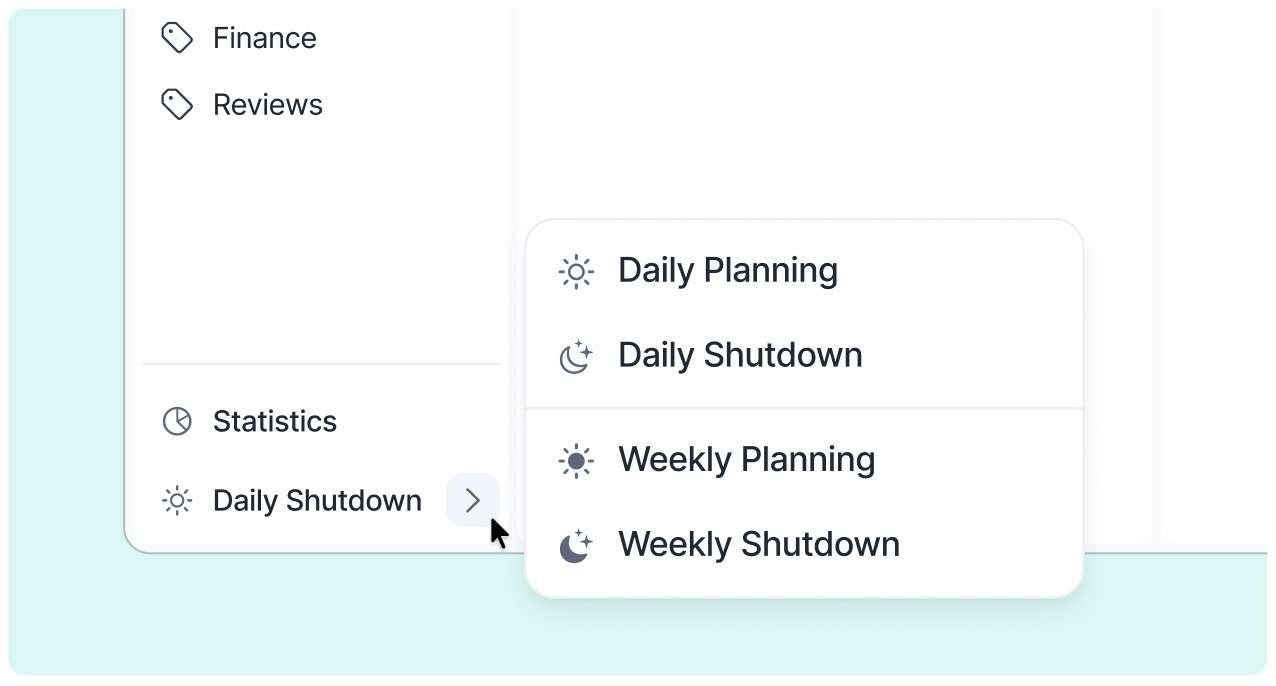
🗓️ Weekly Rituals

  • Plan for success and review your achievements—essential steps for productivity!

  • Akiflow now guides you not only daily but also with Weekly Rituals. Take a few minutes each week to set your intentions (Weekly Planning) and reflect on your progress as the week ends (Weekly Shutdown).

🎯 Goals

  • We’ve renamed the priority option 'Goal of the Day' to simply Goal for consistency across the app.

  • You can now add Weekly Goals while doing your weekly planning and review them at the end of the week. Being tasks, goals can be planned for a specific date or be kept in the Week timeframe.

Demo-Rituals

📝 Quick Note

  • Quick Note is now available in your Weekly Rituals and on your Today page footer, making it easier to jot down thoughts anytime.

🔄 Daily Planning & Shutdown Enhancements

  • Added a new Day Rating feature to reflect on your productivity

  • New plan times to review weekly and monthly tasks while planning

  • Improved stats to better understand your day

  • Resizable and customizable calendar: Hide it, adjust the number of visible days, or resize it to your liking

  • We removed the automation that moved overdue tasks to the next day during shutdown, giving you more control over your tasks.

  • Full UI/UX overhaul for a cleaner, more intuitive experience
    Screenshot 2024-10-31 at 09

🔔 Daily Shutdown Reminders

  • Added reminders to help you wrap up your day—especially useful if you find it hard to stop working.

  • You can set up notifications in Settings > Rituals and/or add a task to your calendar during Daily Planning.
    Screenshot 2024-10-31 at 09
    📚 You can read more here 🔗

👋 Goodbye Snooze! Hello, Time Frames! 🤩

With this release, we're taking task planning to the next level! Plan far into the future while staying in control of your schedule.

🗓️ Introducing Time Frames

  • Organize tasks by week or month right from your Inbox.

  • Assign tasks to future time frames and easily revisit them in your Rituals or on the Upcoming Page.
    Screenshot 2024-10-30 at 17

⌨️ Natural Language & Task Planning

  • Plan tasks using natural language: "this week", "next month", "2nd week of June", "W34", "Someday", and more.

  • Enhanced recognition for phrases like "next week", "in 2 months", or "next quarter" to place tasks in time frames instead of a specific day.

  • Planning tasks is now easier from anywhere: Inbox, command bar, or the task popup. We suggest the right time frames and time slots to fit your workflow.

  • Improved task plan badges: Clearer display of days, weeks, and months without clutter.

👋 Farewell to Snooze

Snooze was a great procrastination ally, so we’ve removed it together with the S and H shortcuts.

  • What happened to my snoozed tasks? Don't worry! All your snoozed tasks have been planned to their original snoozed date.

  • Someday tasks are now part of the new Plan options. All tasks previously in Someday remain accessible on the Upcoming Page.

🔜 Revamped Upcoming Page

We've overhauled the Upcoming page to make planning even smoother, adding new views and customization options:

  • New views: Switch between Overview (time frames), Days (old Upcoming view), Weeks, and Months.

  • Side Time Frame: While in Days, open your Week timeframe on the side to quickly check and move tasks between views.

  • Customize your calendar: Choose how many days to display and resize the calendar to create your ideal planning view.
    Screenshot 2024-10-30 at 17

📚 You can read more here!

🖥️ App Layout Improvements

  • Planner & Calendar Header: We've refined the 'back to Today' button, navigation arrows, and settings to be less visually intrusive.

  • Menu Updates: UI tweaks + Project and Tasks sections are now collapsible, helping you declutter your workspace.

  • Hide Completed Tasks: You now have the option to hide completed tasks in Today for a cleaner view.

  • Dropdown Enhancements: We've reviewed and improved all dropdown components for a smoother experience.

  • View Button and Tags Filter Relocation: The Tags filter has been moved to the new View button, alongside all the other page settings. Enjoy a clearer view!

Screenshot 2024-10-30 at 17

Earlier updates