Meet with your Team
Scheduling meetings with multiple participants can often be a daunting task, but not with Akiflow!
Meet with
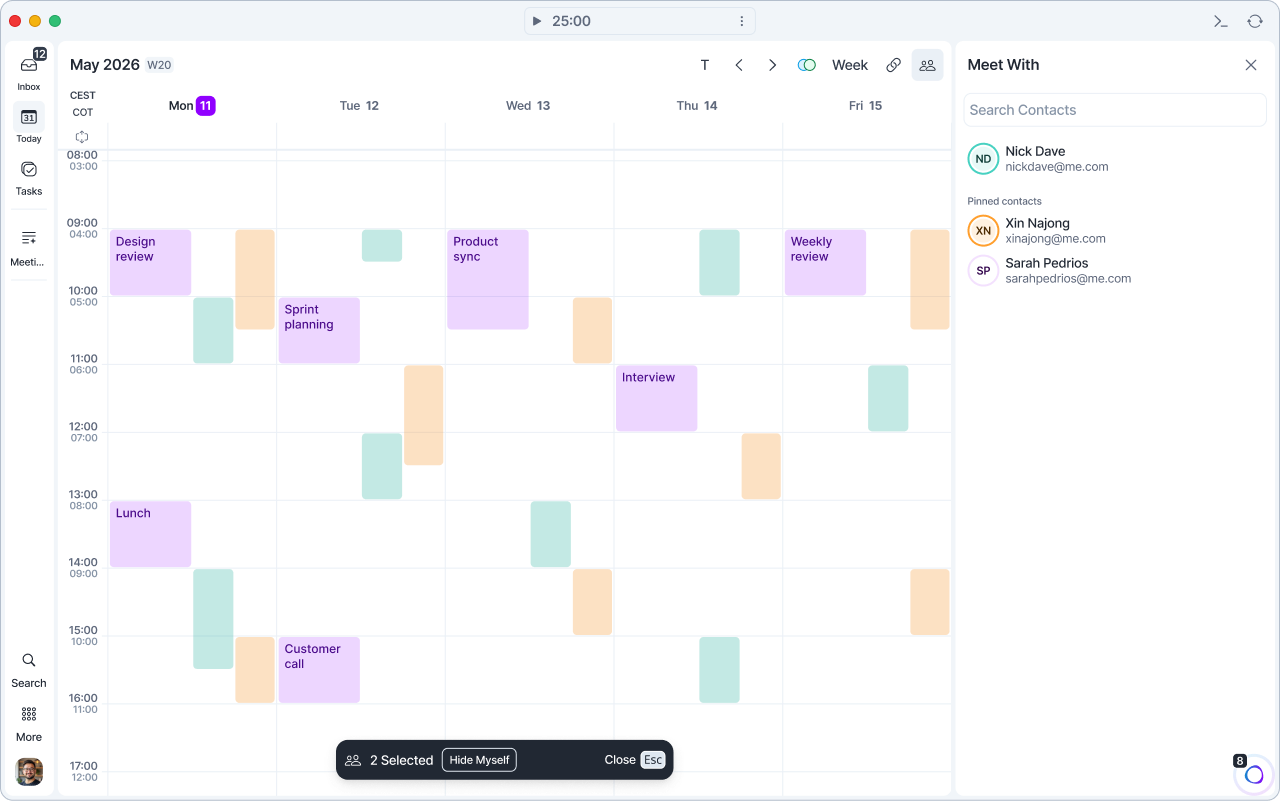
Our Meet with feature lets you check other people's availability and schedule meetings with them in a breeze. Press @ or click the Meet with button in the calendar header, next to Share availability. The Meet With column opens next to your calendar. Your task list collapses while it's open and comes back when you close it.
If someone has shared their calendar with you/publicly, you can check when they're available.
Search people: type a name or email in Search Contacts. Use the arrow keys and Enter to select someone.
Click on the calendar to create a meeting with them.
To close Meet with, press Esc, click the X, or click the Meet with button again. Month view isn't available while Meet with is open.
Hover on a free slot on the calendar to see your colleagues’ time zones.
If you don’t have access to a guest’s calendar, you can send them a request via Google Calendar. You can check this guide from Google.
Pin your teammates
Open Meet with (
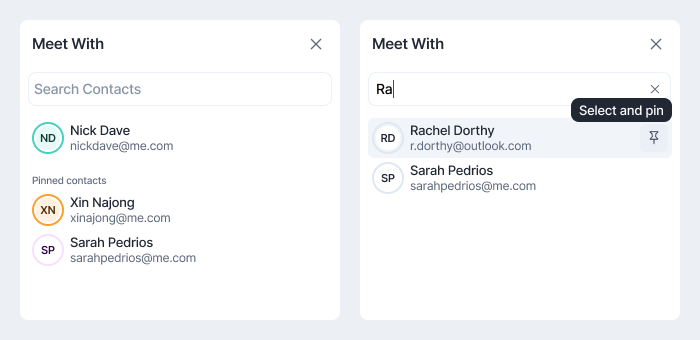
@).Search for a colleague.
Hover their name and click the pin icon (Select and pin).
Pinned colleagues appear under Pinned contacts in the Meet With column, so you can select them quickly next time. To unpin someone, hover their name and click the pin icon again (Unpin).
Select several colleagues to see their calendars side by side. Click Hide Myself in the bar at the bottom of your calendar to hide your own calendar. Show Myself brings it back.
FAQ
Can I use iCloud Calendar with Meet with your Team?
Can I use iCloud Calendar with Meet with your Team?
Not currently. Connecting iCloud Calendar lets you sync your iCloud events, but looking up another person’s availability through Meet with your Team currently supports Google Calendar and Outlook Calendar.
Who can I pin or find in Meet with?
Who can I pin or find in Meet with?
You can pin or find anyone who has shared their calendar with you. Typically, you’ll automatically have access to your teammates calendars (people within your Google or Outlook domain). You can also view calendars that someone has manually shared with you, such as a partner or collaborator.
Can they see my calendar?
Can they see my calendar?
Having someone pinned in Meet with does not give them access to any information that wasn’t already available to them.
This feature is based on your actual Google/Outlook Calendar sharing configuration, so people can see only what you decided to share of that specific calendar with them.
If you’d like to opt out, you can change the calendar (or specific events) visibility settings from your Google/Outlook Calendar settings page or Akiflow.
Do people get a notification if I pin them?
Do people get a notification if I pin them?
No one is notified of the fact that you pinned them.
How to ask for calendar access?
How to ask for calendar access?
If you don’t have access to a colleague's calendar, you can send them a request via Google Calendar. Check this Google guide.
Why aren't all-day events from my pinned calendars showing up?
Why aren't all-day events from my pinned calendars showing up?
All-day events from pinned calendars (the Meet With feature) aren't shown in the calendar view. This is a current limitation by design, not a bug. Timed events from pinned calendars display normally, and only all-day events are hidden.
It comes down to how pinned calendars are laid out: each calendar's events appear in its own dedicated column. All-day events, especially ones spanning several days, would need to stretch across multiple columns, which isn't compatible with that column-based layout, so they're intentionally left out. This applies to both Google and Outlook pinned calendars.
Was this helpful?
Still need help? Ask the team