Searching Tasks & Events
Find any task or event on the Search page, by title, description or guest.
How to open Search
Click Search in the menu on the left.
Press
/orCmd Fon Mac (Ctrl Fon Windows) from anywhere in the app.
You can start typing right away. Press ↓ to jump from the search field to the results.

Search tasks or events
Use the dropdown at the top of the page to choose Tasks or Events.
Tasks: searches titles and descriptions.
Events: searches titles, descriptions, and guest names and email addresses.
Results contain all the words you typed, in any order. When you switch between Tasks and Events, your search text stays but filters and sorting reset.
See all your tasks: leave the search field empty to list every open task, including Inbox, planned and Someday tasks.
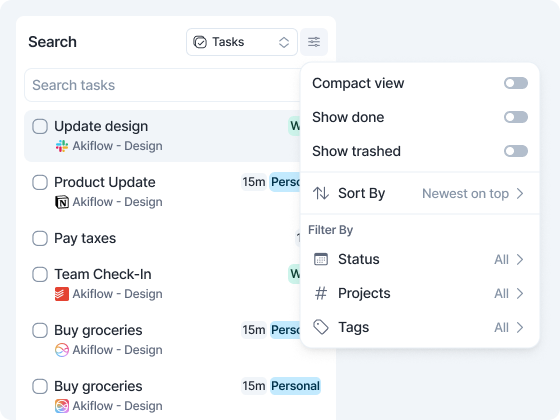
View options
Click the view options button at the top right.
For tasks:
Compact view
Show done and Show trashed, to include completed or trashed tasks (both off by default)
Sort By: Newest on top (default), Oldest on top, Priority, Deadline, Integrations, Projects
Filter By: Status (Inbox or Planned), Projects, Tags. Click Reset to clear the filters.
For events:
Filter By Calendar: pick one or more calendars, grouped by account, with a search box and Reset.
Need help?
Reach out to our team at support@akiflow.com. We're happy to help!
Join our community to ask questions, share your workflow tips, and connect with other Akiflow users who can help you get even more out of Akiflow.
Was this helpful?
Still need help? Ask the team