Your Account
Learn how to manage your Akiflow account: update your details, adjust preferences, and keep everything secure.
Account settings
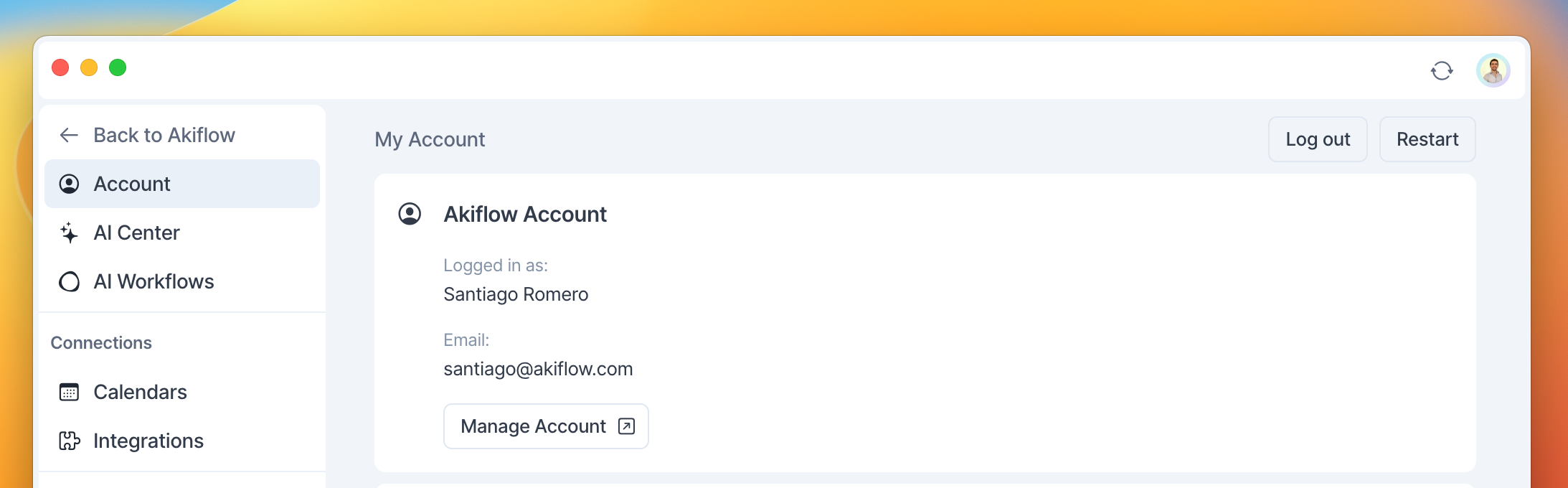
To manage your Akiflow account settings, go to Settings → Account → Manage Account. Here you can edit your account First and Last name and manage your account email.
Changing your account email
To update the email address associated to your account, go to Settings → Account → Manage Account.
When changing your email address, please ensure that the new email has not been previously used to create an Akiflow account, even if that account was never fully set up or subscribed to a plan.
If the new email address is already associated with any existing Akiflow account, you will need to delete that account before using it for the email change.
To delete an account, please visit this link a scroll to the bottom of the page.
This step will help avoid any issues or conflicts when updating your email address.
Downloading your invoices
Go to Settings → Account → Manage Account
Click on Billing. You can download your invoices by clicking Manage Subscription → Billing History → Download
On this page you can also manage your payment methods or update your billing & shipping addresses.
Deleting your account
Go to Settings → Account → Manage Account
At the end of your Account page you can find the option to Delete your account.
If you delete your account, please note that this will remove all of your data, and your subscription will be automatically canceled. We will not be able to restore any of your data.
FAQ
Does signing in with Apple connect iCloud Calendar?
Does signing in with Apple connect iCloud Calendar?
No. Signing in to Akiflow and connecting iCloud Calendar are separate steps. Open Settings → Calendars → Add calendar → iCloud Calendar to connect your calendar.
Can I change my password?
Can I change my password?
Akiflow has a password-less login, so there’s no password!
Can I change my login method?
Can I change my login method?
Your first login method becomes your permanent login method. For example, if you signed up using Google Login, you’ll always need to log in using Google.
If you see the error message “Registered with a different method,” it means you’re trying to log in with a different login method than the one originally used to create your account.
Please try logging in again using the same method you used when signing up for Akiflow:
• Google Login
• Direct email login
• Apple Login
• Microsoft Login
At the moment, it is not possible to change your login method after the account has been created.
Does Akiflow support multiple languages?
Does Akiflow support multiple languages?
At the moment, Akiflow can only be used in English.
How do I restart the Akiflow app?
How do I restart the Akiflow app?
On the web app:
Go to Settings → Account, and on the upper righthand side of the page you'll see a Reload button.
On the desktop app:
Go to Settings → Account, and on the upper righthand side of the page you'll see a Restart button.
On mobile:
Click the Calendar icon on the upper righthand side, then click Refresh
What happens with my data when deleting my account?
What happens with my data when deleting my account?
When you cancel your Akiflow account, most of your data is deleted immediately, with any remaining personal data cleared within 24 hours. However, billing and subscription data is anonymized rather than deleted, and invoices are retained for legal and tax compliance purposes.
It's important to note that "account cancellation" means actively closing your Akiflow account. Simply not paying your subscription, downgrading to a free plan, or deactivating your account does not trigger data deletion. In these cases, your account and data remain intact.
Contact our support team if you have questions about data retention.
How do I cancel my subscription?
How do I cancel my subscription?
Go to Settings → Account → Manage Account → Billing
You'll find a Cancel subscription button below our plans information. Complete the entire cancellation process to ensure your subscription is properly cancelled. If you exit before finishing, your account will remain active.
To confirm your cancellation was successful, click Manage on your current plan. You will also receive an email confirming the cancellation.
Why am I stuck in the onboarding after reactivating my account?
Why am I stuck in the onboarding after reactivating my account?
This happens when cached onboarding data needs to be cleared. Follow these steps to reset the tutorial:
1. Quit Akiflow completely
Click the Akiflow icon in the menu bar
Select "Quit Akiflow" from the dropdown
Ensure the app is fully closed, not just minimized
2. Open the Akiflow data folder
Press
Command (⌘) + Shift + GIn the "Go to the folder" window that appears, paste:
~/Library/Application SupportPress Enter
3. Delete the Akiflow folder
Right-click the "Akiflow" folder
Select "Move to Trash"
4. Restart Akiflow
Launch the app normally
The tutorial should now load properly
Will I still have access my yearly plan after canceling my subscription?
Will I still have access my yearly plan after canceling my subscription?
Yes! When you cancel your Akiflow subscription, you'll retain full access to all features until your current billing period ends:
Yearly plan: Full access until the end of your annual billing cycle
Monthly plan: Full access until the end of your monthly billing cycle
Your subscription won't stop immediately, you get to use Akiflow for the entire period you've already paid for.
Changed your mind? You can easily reactivate your subscription anytime before it expires:
Go to Settings → Account → Manage billing
Reactivate your subscription
My organization changed its Google Workspace domain. Why can’t I log in?
My organization changed its Google Workspace domain. Why can’t I log in?
If your organization changed its Google Workspace domain, your Akiflow login may stop working. Contact support with both your old and new email addresses so we can migrate your account.
Can I pause my subscription?
Can I pause my subscription?
At the moment, Akiflow subscriptions cannot be paused. The only available option is to cancel your subscription.
When you cancel, you’ll still keep full access to your plan and features until the end of your current billing period:
• Monthly plans remain active until the end of the current month
• Yearly plans remain active until the end of the annual billing cycle
Your account and data will stay available during that time. If you decide to come back later, you can resubscribe at any time.
How do I update my payment method?
How do I update my payment method?
To update your payment method, go to Settings → Account → Manage Account → Billing, then click Manage Subscription. Under Payment Methods, you can add a new payment method and set it as your primary one.
How can I export my data from Akiflow?
How can I export my data from Akiflow?
At the moment, Akiflow does not offer a self service option to export tasks that were created directly in Akiflow.
If you need to export your data, please contact our support team and let us know what information you need. While we cannot guarantee that every type of data can be exported, we'll review your request and see how we can help.
Please note that tasks imported from third party integrations (such as Notion, Asana, ClickUp, or others) remain available in their original platforms and can typically be exported directly from those services.
Can I still access my invoices after deleting my account?
Can I still access my invoices after deleting my account?
Yes. Even if you have deleted your Akiflow account, your invoices remain available for legal and tax compliance purposes.
Since you no longer have access to your account settings, invoices cannot be downloaded directly. To obtain a copy of your invoices, please contact our Support team through the chat or email us at support@akiflow.com, and we'll be happy to help.
Was this helpful?
Still need help? Ask the team